ABCFiles Premium Key: How to Use It and Prices
更新日期 ·RapidQuick 编辑部(TUOPIC Co., Ltd.)
简短回答
To use an ABCFiles premium key, log in to abcfiles.net, open "Profile" → "Billing" in the top menu, paste the key into "Enter premium key here" under "Have a premium key?" and click "Apply Premium Key".
Official Premium prices are $19.95 for 30 days, $39.95 for 90 days, $99.95 for 365 days and $159.95 for 999 days (November 2026, payment fees extra depending on the method).
Premium has no speed cap and no waiting time, with 50GB of traffic that refreshes every 3 days (about 16GB a day on average).
How to use your premium key
- After your purchase, find the premium key in the email we send and in your account on our site.
- Log in to ABCFiles (abcfiles.net). If you do not have an account, create one for free with "Sign Up" at the top right.
- Open "Profile" in the top menu, then "Billing".
- Paste the key into "Enter premium key here" under "Have a premium key?" and click "Apply Premium Key".
Check that there is no space before or after the key when you paste it. An extra space can stop a valid key from working.
Enter the key on the ABCFiles account you want to upgrade: log in to your abcfiles.net account, not your account on our site.
ABCFiles 高级会员激活密钥4 种方案 · $27.27 起查看方案与价格 →Official prices and what Premium includes
The official ABCFiles payment page (abcfiles.net/payments) sells four plans: 30, 90, 365 and 999 days (November 2026, in US dollars). The top of the page lists three benefits that every plan shares:
- Unlimited speed (no speed caps)
- No waiting time
- 50 GB traffic — Refreshes every 3 days
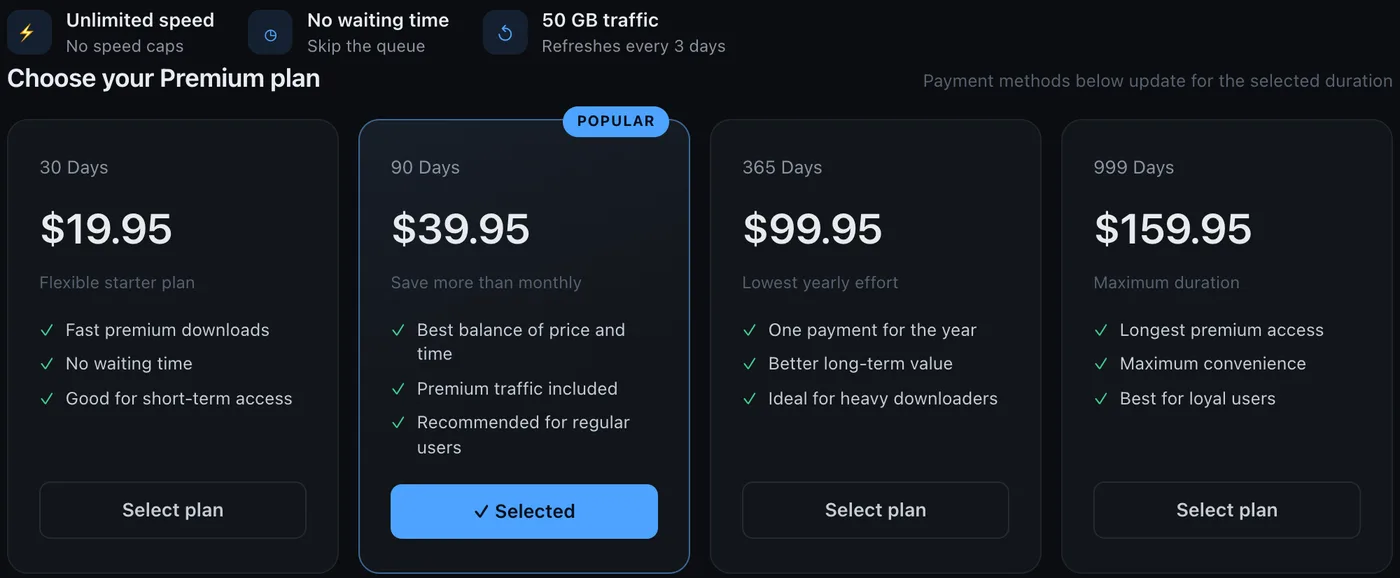
| Plan | Official price | Per day | Good for |
|---|---|---|---|
| 30 days | $19.95 | about $0.67 | Trying it, or a short project |
| 90 days | $39.95 | about $0.44 | Two to three months (ABCFiles' "POPULAR" plan) |
| 365 days | $99.95 | about $0.27 | Using it all year |
| 999 days | $159.95 | about $0.16 | Long-term use |
The official prices do not include fees: depending on the payment method, a payment processor fee is added.
How "50GB every 3 days" works
ABCFiles Premium traffic is counted over 3 days, not per day; the official page says "50 GB traffic — Refreshes every 3 days". If you download several large files at once, what is left drops for a while, so check the remaining traffic on your account page after logging in.
That averages to about 16GB a day, enough for a few large files every day.
Where the official payment page links to us
At the bottom of the official ABCFiles payment page there is a row of "Reseller" buttons. The one marked "日本,worldwide" (Japan, worldwide) leads to RapidQuick (November 2026).
We sell all four lengths, from $27.27 for 31 days. You can pay with Visa, Mastercard, JCB, AMEX, Apple Pay, Google Pay and more, as a one-time payment with no auto-renewal. See the prices on our ABCFiles Premium product page.
If the key does not work
- Check for spaces before or after the key, and that you pasted the right key.
- Check that you are logged in to the ABCFiles account you want to upgrade.
- If it still does not work, contact us with your order number. We will check it and replace the key or refund you.
常见问题
Q. Where do I enter my ABCFiles premium key?
Log in to abcfiles.net, open "Profile" → "Billing" in the top menu, paste the key into "Enter premium key here" under "Have a premium key?" and click "Apply Premium Key".
Q. How much is ABCFiles Premium?
On the official payment page, 30 days is $19.95, 90 days $39.95, 365 days $99.95 and 999 days $159.95 (November 2026, fees extra). We sell it from $27.27 for 31 days.
Q. How much traffic does ABCFiles Premium include?
The official page says "50 GB traffic — Refreshes every 3 days": traffic is counted over 3 days, about 16GB a day on average.
Q. Does your ABCFiles key renew automatically?
No. Our activation keys are a one-time payment and simply end on their expiry date. To keep using Premium, buy and enter another key.