Filezz Premium Key: How to Use It and Prices
更新日期 ·RapidQuick 编辑部(TUOPIC Co., Ltd.)
简短回答
To use a Filezz premium key, log in to filezz.cloud, open "Profile" → "Billing" in the top menu, paste the key under "Apply Premium Key" and click the button below it.
Official Premium prices are $19.95 for 31 days, $39.95 for 90 days and $89.95 for 365 days (November 2026). The official page says "Price is not including the fees".
RapidQuick is listed on the official Filezz payment page as "Reseller 4 (Worldwide, Japan)" and in the official resellers banner section.
How to use your premium key
- After your purchase, find the premium key in the email we send and in your account on our site.
- Log in to Filezz (filezz.cloud). If you do not have an account, create one for free with "Signup" in the top menu.
- Open "Profile" in the top menu, then "Billing".
- Paste the key under "Apply Premium Key" and click "Apply Voucher Codes".
Check that there is no space before or after the key when you paste it. An extra space can stop a valid key from working.
Enter the key on the Filezz account you want to upgrade: log in to your filezz.cloud account, not your account on our site.
Filezz 高级会员激活密钥3 种方案 · $26.88 起查看方案与价格 →Official prices and which plan to pick
The official Filezz payment page ("Premium" in the top menu) sells three plans: 31, 90 and 365 days (November 2026, in US dollars).
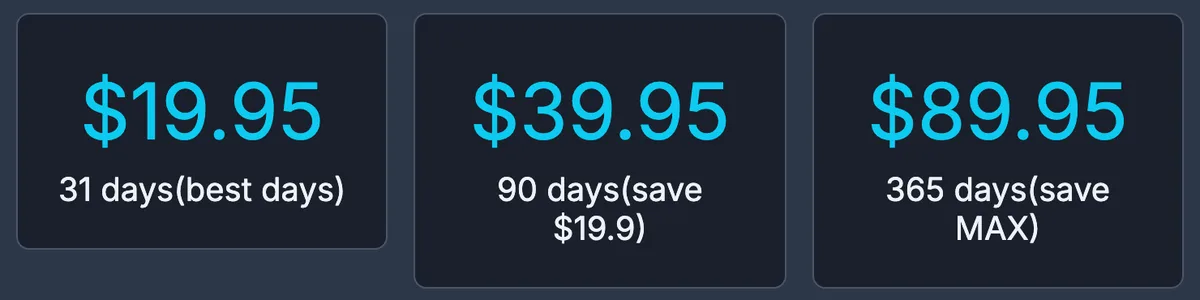
| Plan | Official price | Per day | Good for |
|---|---|---|---|
| 31 days | $19.95 | about $0.64 | Trying it, or a short project |
| 90 days | $39.95 | about $0.44 | Two to three months ($19.9 less than three 31-day plans) |
| 365 days | $89.95 | about $0.25 | Using it all year |
The longer the plan, the less you pay per day: the 365-day plan costs less than half as much per day as the 31-day plan.
Official prices do not include fees
The top of the Filezz payment page says "Price is not including the fees". If you pay by card, PayPal or another method, a payment processor fee is added depending on the method, so you pay more than the price shown.
Our prices already include all fees: the amount you see is the amount you pay.
Where the official payment page lists us
Next to the payment method buttons, the official Filezz payment page has "Reseller" buttons. "Reseller 4", marked "Worldwide、日本" (Worldwide, Japan), opens our product page. Our banner is also shown under "Find out more payment methods from Our Offical Resellers" (November 2026).
We sell all three lengths, from $26.88 for 31 days. You can pay with Visa, Mastercard, JCB, AMEX, Apple Pay, Google Pay and more, as a one-time payment with no auto-renewal. See the prices on our Filezz Premium product page.
If the key does not work
- Check for spaces before or after the key, and that you pasted the right key.
- Check that you are logged in to the Filezz account you want to upgrade.
- If it still does not work, contact us with your order number. We will check it and replace the key or refund you.
常见问题
Q. Where do I enter my Filezz premium key?
Log in to filezz.cloud, open "Profile" → "Billing" in the top menu, paste the key under "Apply Premium Key" and click the button below it.
Q. How much is Filezz Premium?
On the official payment page, 31 days is $19.95, 90 days $39.95 and 365 days $89.95 (November 2026, fees not included). We sell it from $26.88 for 31 days.
Q. Do the official Filezz prices include fees?
No. The official page says "Price is not including the fees", and a fee is added depending on the payment method. Our prices include all fees.
Q. Does your Filezz key renew automatically?
No. Our activation keys are a one-time payment and simply end on their expiry date. To keep using Premium, buy and enter another key.