BtaFile Premium Key: How to Use It and Prices
Updated ·RapidQuick editorial team (TUOPIC Co., Ltd.)
The short answer
To use a BtaFile premium key, log in to btafile.com, open "My Account" in the top menu, paste the key into the "Apply Premium Key" field and click "Apply".
Official Premium prices are $18.99 for 30 days, $39.99 for 90 days, $59.99 for 180 days and $99.99 for 365 days (October 2026).
According to btafile.com, premium members get no waiting time and direct downloads. A free account's My Account page shows 2048MB of traffic available a day.
How to use your premium key
- After your purchase, find the premium key in the email we send and in your account on our site.
- Log in to BtaFile (btafile.com). If you do not have an account, create one for free with "Sign Up" at the top right.
- Open "My Account" in the top menu.

- Paste the key into the "Apply Premium Key" field in the second row and click the orange "Apply" button.
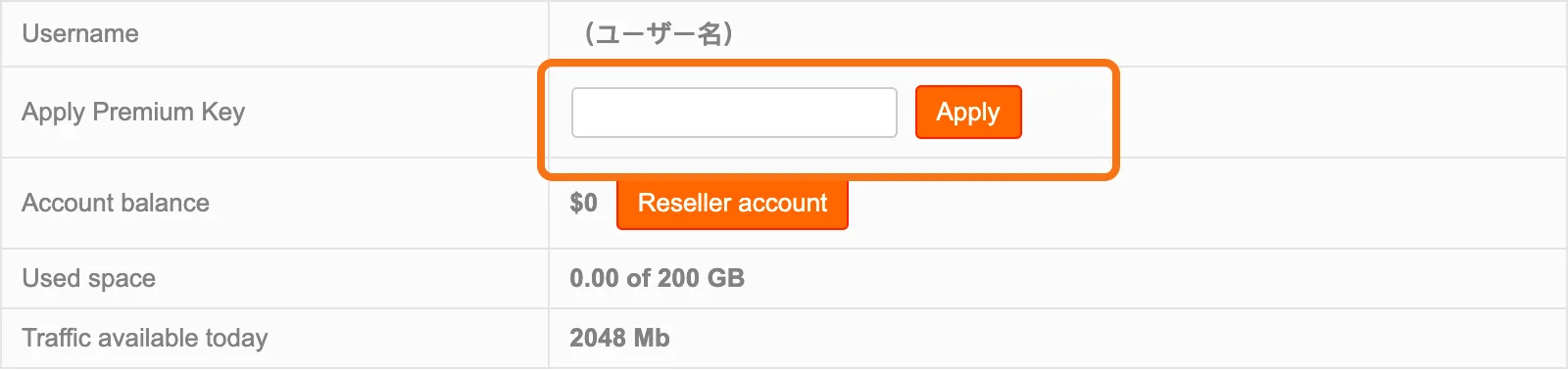
Check that there is no space before or after the key when you paste it. An extra space can stop a valid key from working.
Apply the key on the BtaFile account you want to upgrade: log in to your btafile.com account, not your account on our site.
What BtaFile Premium gives you
The BtaFile home page lists three features (October 2026).

- No speed limit (Maximum Speed): BtaFile says it does not limit the transfer speed of uploads and downloads.
- No waiting, direct downloads (No Wait Download): listed as a benefit for premium members.
- File storage (Unlimited Storage): BtaFile says you can upload unlimited files and keep them.
On a free account, the My Account page shows 200GB of storage (Used space) and 2048MB of traffic available today. If you download large files one after another, a free account runs out of traffic quickly.
Official prices and which plan to pick
The official BtaFile premium page sells four plans: 30, 90, 180 and 365 days (October 2026, in US dollars).

| Plan | Official price | Per day | Good for |
|---|---|---|---|
| 30 days | $18.99 | about $0.63 | Trying it, or a short project |
| 90 days | $39.99 | about $0.44 | Using it for a few months |
| 180 days | $59.99 | about $0.33 | Around half a year |
| 365 days | $99.99 | about $0.27 | Using it all year |
The longer the plan, the less you pay per day: the 365-day plan costs less than half as much per day as the 30-day plan.
We sell the same four plans, from ¥3,200 (about $21) for 30 days. You can pay with Visa, Mastercard, JCB or American Express cards, Apple Pay or Google Pay. See the prices on our BtaFile Premium product page.
If the key does not work
- Check for spaces before or after the key, and that you pasted the right key.
- Check that you are logged in to the BtaFile account you want to upgrade.
- If it still does not work, contact us with your order number. We will check it and replace the key or refund you.
FAQ
Q. Where do I enter my BtaFile premium key?
Log in to btafile.com, open "My Account" in the top menu, paste the key into the "Apply Premium Key" field and click "Apply".
Q. How much is BtaFile Premium?
On the official site, 30 days is $18.99, 90 days $39.99, 180 days $59.99 and 365 days $99.99 (October 2026). We sell it from ¥3,200 (about $21) for 30 days.
Q. What is the difference between a free BtaFile account and Premium?
A free account's My Account page shows 2048MB of traffic a day. According to btafile.com, premium members get no waiting time and direct downloads.
Q. What should I do if my BtaFile key does not work?
Check for extra spaces and that you are logged in to the right account. If it still fails, contact us with your order number and we will replace the key or refund you.