DDownload Ultimate Key: How to Buy and Activate It
Updated ·RapidQuick editorial team (TUOPIC Co., Ltd.)
The short answer
DDownload Ultimate is a paid plan that lets you download up to 200GB a day, with no speed limit and no ads.
When you buy from RapidQuick, you get an Ultimate key starting with "DDL-". Log in to DDownload and enter it via "Enter key" on the dashboard. It takes effect right away.
When it expires, your account goes back to the free plan, but your stored files are not deleted right away.
What DDownload Ultimate gives you
DDownload is a cloud storage service for storing and sharing files. You can use it for free, but free accounts have a heavy download speed limit (the dashboard shows "limited to 30 KB/s").
With Ultimate you get the following (as shown on the official site in October 2026):
- Download up to 200GB a day (about 6,000GB a month)
- No download speed limit and no waiting time
- Unlimited storage
- No ads and priority support
- Simultaneous downloads of multiple files, and support for download managers
"Direct download", which starts the download as soon as you open a file link, is also a setting that Ultimate unlocks.
Plans we sell
| Plan | Good for |
|---|---|
| Trial (1 day) | Testing the speed first, or when one day is enough |
| 30 days | Using it only when you need it |
| 180 days | Use for about half a year |
| 365 days | Use for a full year. The lowest cost per day |
None of them auto-renew. They simply end when the time is up, so there is nothing to cancel.
How to activate an Ultimate key
- After you buy from RapidQuick, find your key starting with "DDL-" in the email and on your account page.
- Log in to DDownload (ddownload.com). If you don't have an account, sign up for free with an email address and password.
- Open "Dashboard" at the top of the page.
- Click "Enter key" in the "Upgrade to ULTIMATE" section.
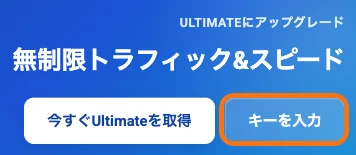
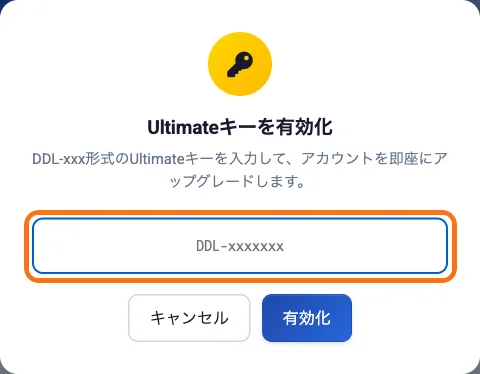
- An "Activate Ultimate key" screen opens. Paste the key and click "Activate".
The DDownload site can be shown in several languages, including English and Japanese. Use the language menu at the top of the page to switch.
New accounts show a "Please verify your email address" message. Open the link in the confirmation email from DDownload. It helps later, for example if you forget your password.
What happens when it expires
According to the official FAQ, when Ultimate expires, your account goes back to the free plan. Your stored files stay available for a while, but free account limits apply. It's a good idea to back up important files on your own device before it expires.
To keep using Ultimate, activate a new key and you'll be back on Ultimate.
FAQ
Q. Where do I enter my DDownload key?
Log in to DDownload and use "Enter key" in the "Upgrade to ULTIMATE" section of the dashboard. Paste your key starting with DDL- and click "Activate". Ultimate starts right away.
Q. How much can I download per day with DDownload Ultimate?
Up to 200GB a day (as shown on the official site in October 2026). There is no speed limit.
Q. Are my files deleted when Ultimate expires?
Not right away. Your account goes back to the free plan. Free account limits then apply, so we recommend backing up important files before it expires.
Q. Will I be charged automatically for a renewal?
No. Our keys add a fixed number of days one time and do not auto-renew.