TezFiles Premium: Prices, Free vs Premium, Gold vs Silver
Updated ·RapidQuick editorial team (TUOPIC Co., Ltd.)
The short answer
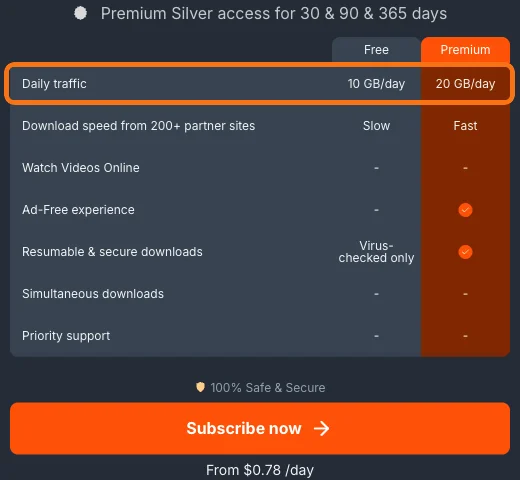
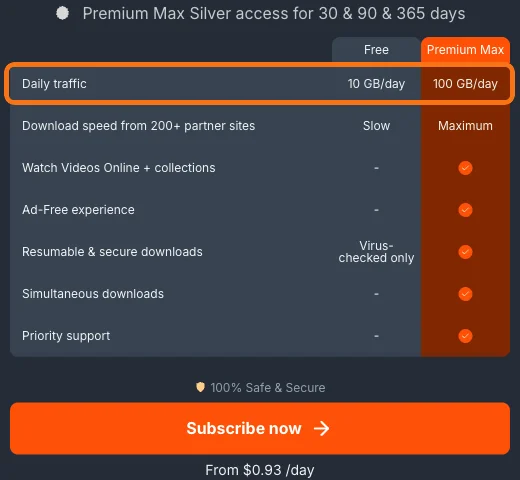
A free TezFiles account can download up to 10 GB a day at slow speed. Premium allows 20 GB a day and Premium Max 100 GB a day. Max also supports online video playback and multiple downloads at once (as shown on the official site in October 2026).
According to the operator, the Gold and Silver names on reseller codes differ only in price. The features are the same. Each reseller decides which name to sell under.
Enter the code at tezfiles.com/auth/activationcode after logging in to TezFiles. Codes have no expiry date before they are activated.
Free vs premium
TezFiles (tezfiles.com) is a file sharing service from the same group as Keep2Share and Fileboom. You can use it for free, but the daily download limit and speed are very different. Here is a summary of the plan table on the official site (October 2026):
| Free | Premium | Premium Max | |
|---|---|---|---|
| Daily download limit | 10 GB | 20 GB | 100 GB |
| Download speed | Slow | Fast | Fastest |
| No ads | - | Yes | Yes |
| Resumable downloads | - (virus check only) | Yes | Yes |
| Online video playback and Collections | - | - | Yes |
| Multiple downloads at once | - | - | Yes |
| Priority support | - | - | Yes |
| Official site price | Free | From $0.78 per day | From $0.93 per day |
Can you use TezFiles for free?
Yes. But according to the official site, free accounts are "Slow" and limited to 10 GB a day. That is fine if you only download a few gigabytes now and then. If you need several large files, premium is the practical choice once you count the waiting time.
The daily limit resets every day. If 20 GB isn't enough on some days, choose Premium Max (100 GB a day).
Gold vs Silver
Resellers sometimes sell TezFiles codes under the names "Gold" and "Silver". The plan table on the official site also mentions "Premium Silver access" and "Premium Max Silver access", but it doesn't explain Gold.
We asked the operator's support. Their answer: the only difference between Gold and Silver is the price, and each reseller decides which name and price to sell under. The daily download limit and everything else are the same, so for the same number of days you can simply pick the cheaper one.
RapidQuick sells both Silver and Gold for Premium and for Premium Max. If you're unsure, choose Silver.
Which one to choose
- Occasional use, 20 GB a day is enough → Premium (Silver)
- Heavy daily downloads, or you want to watch videos online → Premium Max (Silver)
- Length: 30, 90 or 365 days. The longer the plan, the lower the price per day.
Note that TezFiles premium only works for TezFiles files. Even though they are in the same group, you need a separate premium for Keep2Share or Fileboom to download their files at full speed.
How to use the activation code
When you buy from RapidQuick, you get an activation code by email and on your account page.
- Log in to TezFiles (tezfiles.com). If you don't have an account, create one for free with "Register".
- Open the code page (tezfiles.com/auth/activationcode). If you aren't logged in, you will be sent to the login screen, so open the page again after logging in.
- Paste the code and activate it.
On Keep2Share, from the same group, reseller codes are 40 alphanumeric characters. When you copy the code, make sure no spaces or line breaks get added before or after it. According to the operator, codes have no expiry date before they are activated.
What to check if you can't download
Have you used up your daily limit?
The daily limit is 10 GB for free accounts and 20 GB for Premium. Once you hit it, you can't download until it resets the next day.
Is premium active?
Check that the account you entered the code on is the same account you are logged in with in the browser you are downloading from. If you are logged in with a different account, you are treated as a free user.
"You are not subscribed to…" appears
Some TezFiles files can only be downloaded by members of a partner site. Files that show this message can't be downloaded with TezFiles premium alone.
The code shows as "invalid"
Check that the code is for TezFiles (not for Keep2Share or Fileboom) and that all 40 characters are entered. If it still doesn't work and you bought it from RapidQuick, contact us with your order number. The operator's help also says that if a code bought from a reseller has a problem, you should contact the reseller first.
FAQ
Q. What is the difference between TezFiles Gold and Silver?
According to the operator's support, only the price differs. The features and daily download limit are the same. Each reseller decides which name to sell under.
Q. Can I use TezFiles for free?
Yes. But according to the official site, free accounts are slow and limited to 10 GB a day. Premium allows 20 GB a day and Premium Max 100 GB a day.
Q. Do I need a TezFiles account to use premium?
Yes. The activation code is applied to the TezFiles account you are logged in with. If you don't have one, create it for free with "Register" on the official site.
Q. Where do I enter a TezFiles activation code?
Log in to TezFiles, then enter it at tezfiles.com/auth/activationcode.
Q. Why can't I download from TezFiles?
The usual causes are: you used up your daily limit, you are logged in with a different account from the one you activated premium on, or the file is for partner-site members only (it shows "You are not subscribed to…").