Rapidgator Premium Price: Plans Compared, Payment and How to Buy
업데이트 ·RapidQuick 편집팀 (TUOPIC Co., Ltd.)
요약
Official Rapidgator Premium prices run from $14.99 for 30 days (1TB) to $99.99 for 365 days (12TB) (October 2026). Our one-time activation keys start at $22.52 for 30 days (1TB); 180 days (6TB) is $84.22 and 365 days (12TB) $168.50.
The best value per day and per TB of bandwidth is 180 days or 365 days (12TB). 30 and 60 days cost the most per TB, so if you need Premium for a few months, pick 90 days or longer.
The official site takes Visa and Mastercard only and renews automatically by default. If you want to pay another way or avoid auto-renewal, enter an activation key from a reseller on the Buy Premium page.
Prices: official plans and our activation keys
Official basic plans (October 2026)
These are the basic plans on the official "Buy Premium" page. Bandwidth is the total amount you can download during the period; storage is the space for files you upload.
| Period | Bandwidth | Storage | Official price |
|---|---|---|---|
| 30 days | 1TB | 1TB | $14.99 |
| 60 days | 2TB | 2TB | $29.99 |
| 90 days | 4TB | 3TB | $39.99 |
| 180 days | 6TB | 6TB | $49.99 |
| 365 days | 12TB | 12TB | $99.99 |
Our activation keys
We sell 15 plans, including bigger-bandwidth versions of the same lengths. The main ones (prices as of when you open this page):
| Plan | Bandwidth | Price | Per day |
|---|---|---|---|
| 30 days | 1TB | $22.52 | $0.75 |
| 60 days | 2TB | $46.73 | $0.78 |
| 90 days | 4TB | $61.76 | $0.68 |
| 180 days | 6TB | $84.22 | $0.47 |
| 365 days | 12TB | $168.50 | $0.46 |
| 365 days | 24TB | $373.19 | $1.02 |
There are also 30 days 2TB/4TB, 60 days 4TB/6TB, 90 days 6TB/12TB, 180 days 12TB/24TB and 365 days 48TB.
Rapidgator 프리미엄 활성화 키15개 플랜 · $22.52부터플랜과 가격 보기 →Which plan is the best value?
Longer plans are cheaper, but not in proportion to their length. Compared by price per TB of bandwidth (our prices, November 2026):
- Best value: 180 days and 365 days (12TB), about ¥2,160 per TB and the cheapest per day.
- Most expensive: 60 days, about ¥3,590 per TB, more than 20% dearer than two 30-day plans.
- 30 days: about ¥2,900 per TB, about 30% more than 180 days, but you pay for only one month.
- 90 days: 4TB of bandwidth, about ¥2,370 per TB: about 20% cheaper than 30 days and 30% cheaper than 60 days.
Choose by bandwidth: Premium ends when it runs out
This is where most people get caught out. Premium has a bandwidth limit as well as a length, and it ends as soon as you use up the bandwidth, even if days are left.
| Plan | Bandwidth | Average per day |
|---|---|---|
| 30, 60, 180 days, 365 days (12TB) | in proportion to length | about 33GB |
| 90 days | 4TB | about 44GB |
| 365 days (24TB) | 24TB | about 66GB |
Bandwidth is a total for the whole period, so a heavy day is fine as long as the total fits. If you often download more than 33GB a day, pick 90 days, 365 days (24TB) or a bigger-bandwidth plan.
If downloads suddenly slow down, check first whether you have used up your bandwidth. Other causes are in Rapidgator Premium slow? Causes and fixes.
Recommendations by use
- One month only: 30 days. Expensive per TB, but you do not pay for months you do not use.
- Two to three months: 90 days rather than 60 — twice the bandwidth and about 30% cheaper per TB.
- Six months or more: 180 days, the cheapest way to use Rapidgator.
- All year: 365 days (12TB) — about the same as two 180-day plans, with no need to buy again.
- Very large downloads: 365 days (24TB) or a bigger-bandwidth plan.
Paying on the official site
Visa and Mastercard only
Below the "Buy Premium" button, the official premium page shows the cards it accepts.
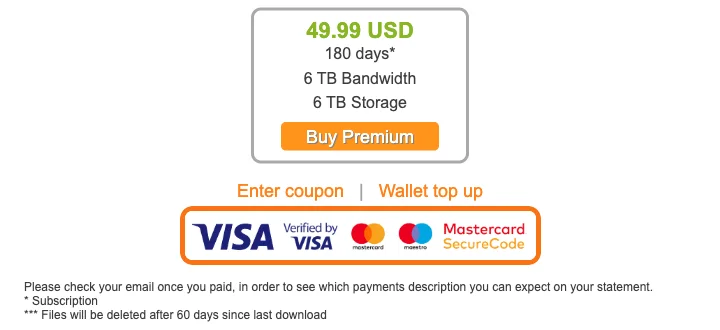
Only Visa (Verified by Visa) and Mastercard (Maestro, Mastercard SecureCode) are shown (October 2026). There is no JCB, American Express or Diners Club. Prices are in US dollars, and your card company converts them, so the final charge can differ a little.
If your card is declined
- Card brand: is it Visa or Mastercard?
- Your card company: foreign or USD payments may be blocked. Check the card app for alerts, make sure 3-D Secure is set up, or ask your bank.
- Prepaid cards: many are refused for foreign recurring payments.
Rapidgator says the name on your card statement is given in the email you receive after paying. It may not say "Rapidgator", so keep that email.
The official site renews automatically
Premium bought with "Buy Premium" on the official site is an auto-renewing subscription. The FAQ on the purchase page says:

- Buying Premium turns auto-renewal on by default
- 24 hours before Premium ends, the same plan is charged again
- You can turn it off on your Rapidgator profile page
If you only want it once, turn off auto-renewal on your profile page after buying.
Google Play (Android app)
The top of the official premium page says you can buy Premium in the Android app through Google Play.

Your Google Play payment methods work there; prices and renewal follow what Google Play shows.
Buying an activation key and how to use it
Rapidgator has an official reseller program: you buy an activation key from a reseller and enter it on your own account. RapidQuick is one of those resellers.
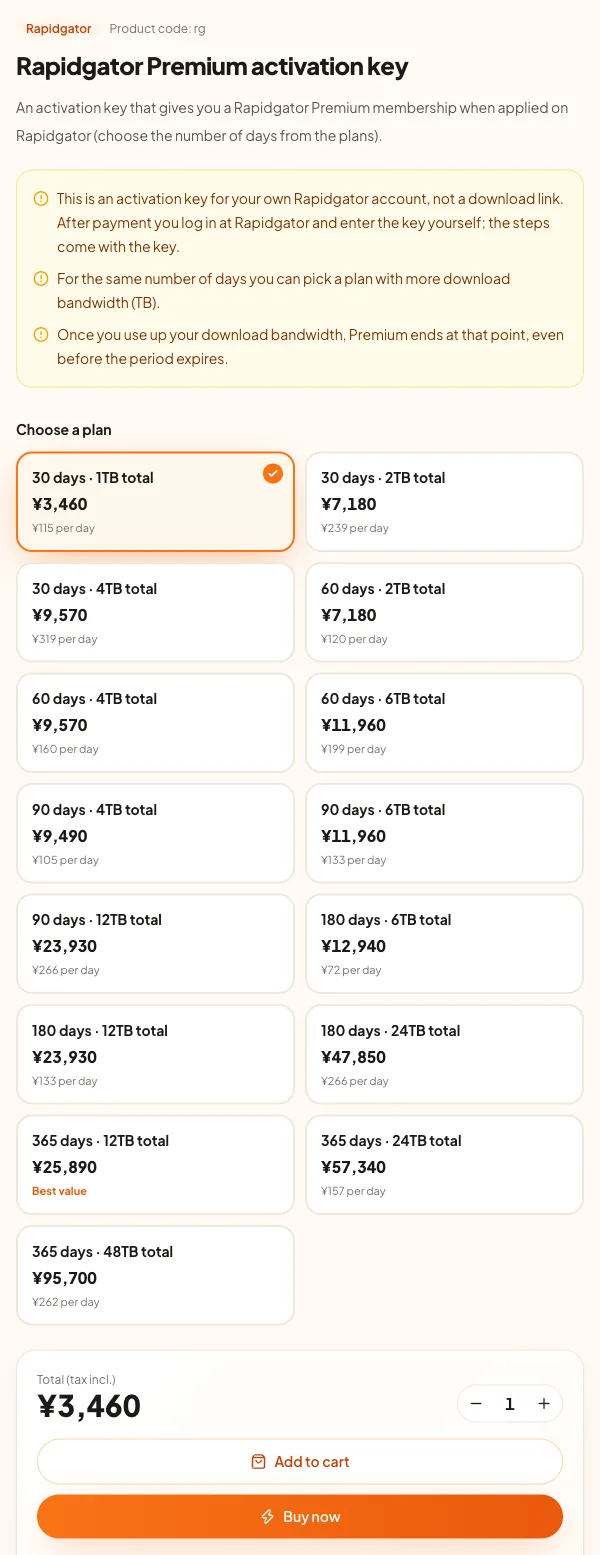
- Many payment methods: Visa, Mastercard, JCB, American Express, Apple Pay, Google Pay and more.
- No auto-renewal: the key adds a fixed period once, so there is nothing to cancel.
How to enter the key
- After your purchase, find the activation key in the email we send and in your account on our site.
- Log in to Rapidgator (create a free account with "Registration" at the top right if needed).
- Open "Buy Premium" at the top of the page.
- Click "Enter coupon" below the plan selector.
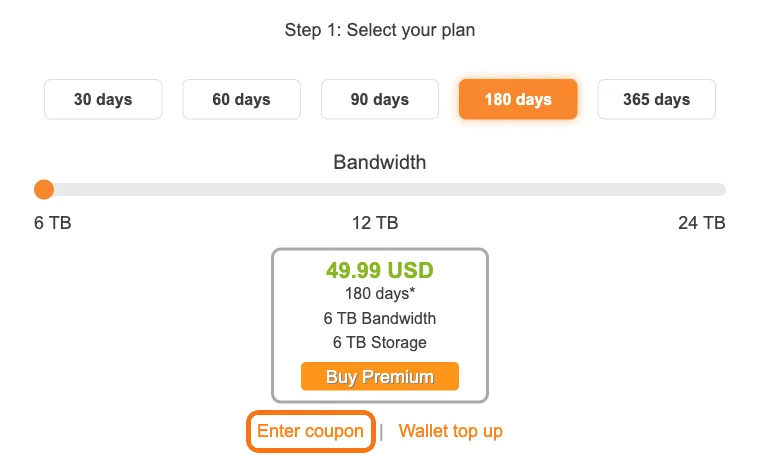
- Paste the activation key and apply it.
The field only opens when you are logged in. If you see "Please login or register on the site", log in first.
While an account already has Premium, the field may not appear. Apply the key after the current Premium ends. The days count from the moment you enter the key.
Comparison of the ways to buy
| Official site (card) | Android (Google Play) | Reseller activation key | |
|---|---|---|---|
| Payment methods | Visa, Mastercard | Google Play methods | Depends on the reseller (we take JCB, AMEX, Apple Pay and more) |
| Currency | US dollars | As shown in Google Play | Reseller's currency |
| Auto-renewal | Yes (can be turned off) | As shown in Google Play | No |
| What you need | A Rapidgator account | An Android device and account | A Rapidgator account |
If you only care about the lowest possible price, the official site can be cheaper. If you want another payment method or no auto-renewal, an activation key is the simpler choice.
How long files are kept
According to the official FAQ, files on free accounts are deleted 30 days after the last download. With capped-storage Premium they are kept while Premium is active; with unlimited-storage Premium they are deleted 60 days after the last download.
What a free account cannot do is covered in Rapidgator free account limits, and Rapidgator vs Keep2Share helps if you are choosing between the two. All 15 of our plans are on the Rapidgator Premium product page.
자주 묻는 질문
Q. How much is Rapidgator Premium?
On the official site, 30 days (1TB) is $14.99, 60 days (2TB) $29.99, 90 days (4TB) $39.99, 180 days (6TB) $49.99 and 365 days (12TB) $99.99 (October 2026). Our activation keys start at $22.52 for 30 days (1TB).
Q. Which Rapidgator plan is the best value?
Per day and per TB of bandwidth, 180 days and 365 days (12TB) are the cheapest. 60 days costs more than ¥3,000 per TB and 30 days about ¥2,900 (November 2026).
Q. Why did my Premium end before the expiry date?
Premium ends as soon as you use up the plan's bandwidth, even if days are left. The 30-day plan includes 1TB, about 33GB a day on average.
Q. Can I pay for Rapidgator with JCB or American Express?
Not on the official site: it shows only Visa and Mastercard (including Maestro) as of October 2026. Resellers such as RapidQuick accept JCB, American Express, Apple Pay and Google Pay for activation keys.
Q. Does Rapidgator Premium renew automatically? How do I cancel?
Premium bought on the official site renews automatically by default, 24 hours before it ends. Turn it off on your profile page. An activation key adds the period once, so there is no renewal and nothing to cancel.
Q. Where do I enter a Rapidgator activation key?
Log in, open the Buy Premium page and click the link below the plan selector to open the key field, then paste the key. The field only opens when you are logged in.