Keep2Share Activation Code: Buy and Redeem
Updated ·RapidQuick editorial team (TUOPIC Co., Ltd.)
The short answer
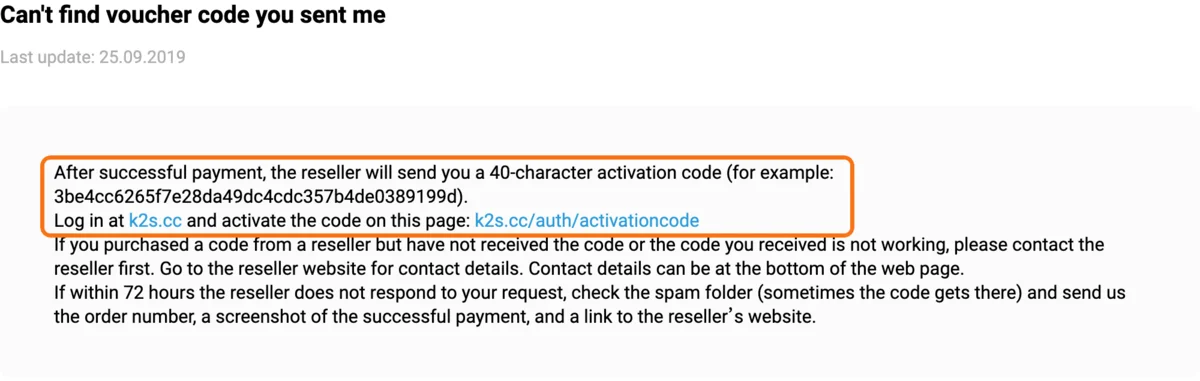
A Keep2Share activation code (also called a premium key or voucher) is a 40-character code sold by official resellers. You log in at k2s.cc and enter it at k2s.cc/auth/activationcode. It adds a fixed number of premium days once and never renews.
Keep2Share runs its own reseller program, and its payment window has a Resellers tile that lists shops selling codes. RapidQuick is one of them: Keep2Share PRO codes start at ¥5,490 (about $35) and MAX codes at ¥7,250 (about $46) for 30 days (November 2026), paid by card, Apple Pay or Google Pay, with the code sent by email.
If a code does not arrive or does not work, Keep2Share asks you to contact the reseller first. Do not make a second account to use it: Keep2Share's help says it does not allow multiple accounts for one user.
What a Keep2Share activation code is
An activation code is prepaid Keep2Share premium. Shops call it a premium key, a voucher, a K2S code or a reseller code, but it is the same thing: a 40-character string of letters and numbers. Keep2Share's own help gives 3be4cc6265f7e28da49dc4cdc357b4de0389199d as an example.
You pay the reseller once, the reseller sends the code, and you add it to your account. Compared with buying on k2s.cc:
| Plan bought on k2s.cc | Activation code from a reseller | |
|---|---|---|
| Renews automatically | 30 and 90-day plans do | Never, used once |
| Where you pay | Keep2Share's payment window | The reseller's shop |
| Can be given to someone else | No | Yes, whoever enters it gets the days |
| Where it is used | Added to your account at checkout | k2s.cc/auth/activationcode |
A code is a good fit if you want exactly one month without a subscription, want to pay with a method k2s.cc does not offer you, or want to give premium as a gift. If you only care about the lowest price, check the official prices too: they are listed in Keep2Share premium price, discounts & PayPal.
Where to buy a Keep2Share code
Keep2Share sells codes through resellers on purpose. Its help center answers "May I resell premium accounts?" like this:

On k2s.cc, the payment window has a Resellers tile next to the cards and wallets. It opens a list of shops that sell codes. Keep2Share says the list is ordered by how many codes each shop's customers activate and by the visitor's location, so it does not show every reseller everywhere.
Before you pay a shop, check three things:
- Is it on the official list (or does it say which hoster lists it)? A code from an unknown seller may already be used, or be cancelled later.
- Does it show the company behind it and a support address that answers?
- Is the code sent right away, and is there a refund rule for unused codes?
Keep2Share code prices at RapidQuick
RapidQuick (TUOPIC Inc., Tokyo) is an official Keep2Share reseller. We sell two code types. Prices are in yen with tax included, and the dollar amounts are approximate (November 2026):
| Code | Daily download | 30 days | 90 days | 365 days |
|---|---|---|---|---|
| Keep2Share PRO | 50 GB | ¥5,490 (about $35) | ¥13,470 (about $85) | ¥51,120 (about $324) |
| Keep2Share MAX | 100 GB | ¥7,250 (about $46) | ¥17,890 (about $113) | ¥63,390 (about $401) |
- Payment: Visa, Mastercard, AMEX, JCB, Apple Pay, Google Pay and other local methods at checkout. You pay once, and nothing renews.
- Delivery: the code is shown after payment and sent by email, usually within a minute.
- Refunds: an unused code can be refunded within 7 days. Once it is activated, it cannot be.
Our prices are higher than the official 30-day prices on k2s.cc (Premium Pro is about $30, Premium Max about $40). You pay that difference for a one-time code instead of a subscription. Not sure whether you need 50 GB or 100 GB a day? See Keep2Share PRO vs MAX.
How to redeem a Keep2Share code
- Log in at k2s.cc. If you have no account yet, register one first with your own email address.
- Open k2s.cc/auth/activationcode.
- Paste the 40-character code. Copy and paste it rather than typing it, and make sure there is no space before or after it.
- Confirm. The premium days are added to the account you are logged in to.
The same code works only on k2s.cc. Fileboom, TezFiles and PrimePlus belong to the same group but use their own codes. See the four K2S group sites compared.
If the code does not work
- Typo or extra space: paste the code again. One missing or extra character makes the code invalid.
- Wrong site: a TezFiles or Fileboom code does not work on k2s.cc, and the other way round.
- Already used: a code can be used only once. If you did not use it, contact the shop with your order number.
- No code received: check your spam folder first. Keep2Share's help says to contact the reseller first, and if the reseller does not answer within 72 hours, to send Keep2Share the order number, a screenshot of the payment and a link to the reseller's site.
Do not register a second account just to use a code. Keep2Share's help is clear about this:

If a code from RapidQuick is refused, reply to the delivery email with a screenshot of the message. We check the code's status with Keep2Share and fix it with you.
FAQ
Q. Where do I enter a Keep2Share activation code?
Log in at k2s.cc and open k2s.cc/auth/activationcode. Paste the 40-character code there and confirm. The days go to the account you are logged in to.
Q. Is a Keep2Share voucher the same as an activation code?
Yes. Shops call it a voucher, a premium key, a K2S code or a reseller code. Keep2Share's help calls it a 40-character activation code, and it is entered at k2s.cc/auth/activationcode.
Q. Does a Keep2Share code renew automatically?
No. A code adds a fixed number of days once. Only 30 and 90-day plans bought directly on k2s.cc renew automatically.
Q. Where can I buy a legit Keep2Share code?
From a reseller in the Resellers tile on k2s.cc's payment window. RapidQuick is an official Keep2Share reseller: PRO codes start at ¥5,490 (about $35) and MAX codes at ¥7,250 (about $46) for 30 days (November 2026).