Kenfiles Premium vs PRO: Plans and How to Redeem a Voucher
Updated ·RapidQuick editorial team (TUOPIC Co., Ltd.)
The short answer
Kenfiles Premium lets you download up to 78GB a day, and Premium PRO up to 195GB a day. Free members get 5GB a day (as shown on the official site in October 2026).
Bandwidth-only coupons add 2TB to 20TB of download traffic. They do not add Premium days.
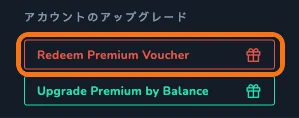
To redeem a voucher, log in and click "Redeem Premium Voucher" on your account page.
How the plans differ
Here is the plan table from the official Kenfiles site, summarized.
| Free | Premium | Premium PRO | |
|---|---|---|---|
| Daily download limit | 5GB | 78GB | 195GB |
| Download speed | Limited | Unlimited | Unlimited |
| File storage | Deleted 60 days after the last download | Never deleted | Never deleted |
| Users | - | 1 | 3 |
| Support | - | Standard | Priority |
With Premium or higher, there is no waiting time, CAPTCHA or ads before a download. You can also resume downloads and download several files at once.
Files of free members are deleted 60 days after their last download. If you want to use Kenfiles to store files, Premium or higher is the safer choice.
Which one to choose
- Everyday use: Premium (78GB a day). This is enough for most people.
- Heavy downloading, or sharing with family or coworkers: Premium PRO (195GB a day, up to 3 users).
- You still have Premium days left but need more download traffic: a bandwidth-only coupon.
What is a bandwidth-only coupon?
The coupons we sell as "Bandwidth only (2TB / 5TB / 10TB / 20TB)" are listed as "30Days Premium Traffic" on the official Kenfiles site. They add to the amount you can download. They do not extend your Premium days, so use them on a Kenfiles account that already has Premium.
How to redeem a voucher
- After you buy from RapidQuick, find your voucher code in the email and on your account page.
- Log in to Kenfiles (kenfiles.com). If you don't have an account, you can create one for free with the sign-up button at the top right.
- Open your account page. In the "Upgrade account" box on the right, click "Redeem Premium Voucher".
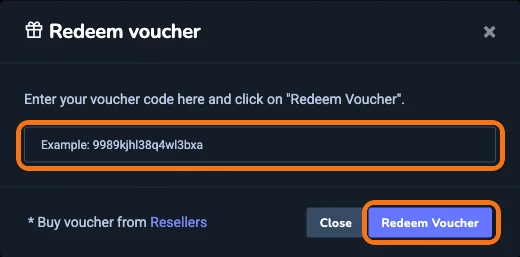
- The "Redeem voucher" screen opens. Paste your code and click "Redeem Voucher".
You can also switch the Kenfiles site to Japanese from the language menu at the bottom of the page. Some items stay in English.
FAQ
Q. Where do I enter a Kenfiles voucher?
Log in, go to your account page and click "Redeem Premium Voucher" in the "Upgrade account" box. Paste the code into the field that appears and click "Redeem Voucher".
Q. What is the difference between Kenfiles Premium and Premium PRO?
The daily download limit and the number of users. Premium allows 78GB a day for 1 user. Premium PRO allows 195GB a day for up to 3 users and includes priority support.
Q. Can I use a bandwidth-only coupon on a free account?
A bandwidth-only coupon adds download traffic and does not extend Premium days. Use it on an account that already has Premium.
Q. When are free members' files deleted?
According to the official Kenfiles site, free members' files are deleted 60 days after their last download. Files are not deleted on Premium or higher.