Rapidgator Premium Price and How to Buy: Using a Coupon Code
Updated ·RapidQuick editorial team (TUOPIC Co., Ltd.)
The short answer
You can get Rapidgator Premium in two ways: pay by credit card in US dollars on the official site, or buy a coupon from a reseller and apply it to your account.
To use a coupon, log in and click "Enter coupon" on the "Buy Premium" page. Coupons do not renew automatically, so nothing is charged after the period ends.
Premium ends as soon as you use up your plan's bandwidth (the total amount you can download), even if days are left. Choose a plan by bandwidth, not just by length.
Rapidgator's official plans (as of October 2026)
These are the basic plans on the official "Buy Premium" page. Bandwidth is the total amount you can download during the period. Storage is how much space you get for files you upload.
| Period | Bandwidth | Storage | Official price |
|---|---|---|---|
| 30 days | 1TB | 1TB | $14.99 |
| 60 days | 2TB | 2TB | $29.99 |
| 90 days | 4TB | 3TB | $39.99 |
| 180 days | 6TB | 6TB | $49.99 |
| 365 days | 12TB | 12TB | $99.99 |
There are also 365-day plans with more bandwidth. RapidQuick sells two of them: 12TB and 24TB.
With Premium, the download speed limit is removed. You can download several files at once, you skip waiting times and ads, and you can download files up to 80GB.
Buying on the official site vs. buying a coupon
If you buy directly on the official site, prices are in US dollars, and some card issuers add a foreign transaction fee. The checkout page also says "subscription". By default, it renews automatically (and charges you again) 24 hours before it expires. To stop this, you have to turn off auto-renewal on your profile page.
A reseller coupon is a code that adds one fixed period of Premium, once. There is no auto-renewal. It simply ends when the period is over.
- You want to pay in Japanese yen with your usual card, Apple Pay or Google Pay
- You don't want to enter your card details on an overseas site
- You want to use it only for the time you need, without worrying about auto-renewal
If any of these apply to you, a coupon is a good fit. If you just want the lowest price, even after exchange rates and fees, the official site can sometimes be cheaper.
If your card is declined on the official site, see What to do when your credit card doesn't work on Rapidgator. It covers whether JCB works, prepaid cards and buying through Google Play.
How to apply a coupon
- After buying from RapidQuick, find your coupon code in the email and on your account page.
- Log in to Rapidgator. (No account? Create one for free with "Registration" in the top right.)
- Open "Buy Premium" at the top of the page.
- Click "Enter coupon" below the plan selection.
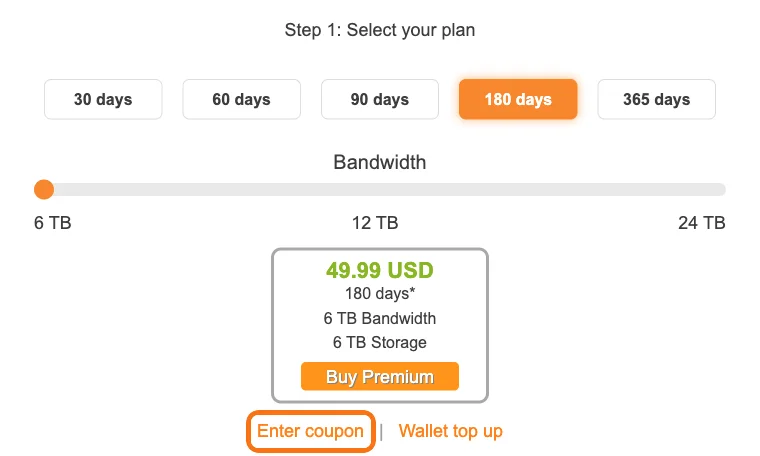
- Paste your coupon code and apply it.
"Enter coupon" only opens when you are logged in. If you click the link and see "Please login or register on the site", log in first.
If your account already has active Premium, the coupon field may not appear. In that case, apply the coupon after your current Premium ends. The Premium days start counting from the moment you apply the coupon.
Premium ends when you run out of bandwidth
This is where many people get caught out. Premium has a bandwidth limit on top of the number of days. If you use up the bandwidth, Premium ends right then, even if days are left.
For example, the 30-day plan has 1TB of bandwidth. If you download 50GB a day, you hit the limit in 20 days. If you often download large files, the 180-day (6TB) or 365-day (12TB or 24TB) plans give you more days and more bandwidth, and they are cheaper per TB too.
If downloads suddenly get slow, first check whether you have used up your bandwidth. For other causes and the order to check them, see Rapidgator slow on Premium: causes and fixes.
Also, according to the official FAQ, files on a free account are kept for 30 days after the last download. On Premium plans with a storage limit, files are not deleted while Premium is active. On Premium plans with unlimited storage, files are deleted 60 days after the last download. Keep this in mind if you use Rapidgator for storage.
Which plan to choose
- Just trying it, or only need it for a short time: 30 days (1TB bandwidth)
- Regular use every month: 90 days (4TB bandwidth) or 180 days (6TB bandwidth)
- Lots of data over a long time: 365 days with 12TB or 24TB
If you need a coupon for Solo Subscription (a separate subscription feature on Rapidgator), write it in the notes field when you order (30, 180 and 365 days only).
For the price per day and per TB of each plan, see Which Rapidgator plan is the best value? 30 to 365 days compared by price and bandwidth.
FAQ
Q. Where do I enter a Rapidgator coupon?
Log in to Rapidgator and click "Enter coupon" below the plan selection on the "Buy Premium" page. The coupon field does not open unless you are logged in.
Q. Does Premium bought with a coupon renew automatically?
No. A coupon adds one fixed period, once, and it ends when the period is over. To keep using Premium, apply a new coupon.
Q. Why did my Premium end before the expiry date?
Premium ends as soon as you use up your plan's bandwidth (the total amount you can download), even if days are left. For example, the 30-day plan has 1TB of bandwidth.