Is Rapidgator Safe? Payments, Account Security and Files
Updated ·RapidQuick editorial team (TUOPIC Co., Ltd.)
The short answer
According to Rapidgator's official site, connections are encrypted, payments are handled by a PCI DSS Level 1 compliant payment processor, and Rapidgator itself does not store card details or other financial information.
To protect your account, you can turn on two-step authentication, register the IP addresses allowed to log in, and check your login history on your profile page.
The part that needs care is the files you download. They were uploaded by other people, so scan them with security software before opening, and don't download anything that was uploaded illegally.
Think about "safe" in three parts
When people ask "Is Rapidgator safe?", they usually mean one of these:
- Money: Is it OK to enter my card details? Will I be charged without knowing?
- Account: Could my account be hacked or suspended?
- Files: Could the files I download contain viruses? Are they legal?
For each one, here is what the official site says and what you should watch out for yourself.
1. Are payments safe?
Rapidgator's official FAQ has a question along the lines of "I'm worried about buying Premium. Is it safe?" It answers like this:

The Premium purchase page also says that "payments are processed over an SSL-encrypted connection, and the payment processor is PCI DSS Level 1 compliant". PCI DSS is an international security standard for companies that handle card data. Level 1 is the tier for companies with the highest transaction volume.
On the money side, these are the two things to actually watch:
- Auto-renewal: If you buy Premium on the official site, auto-renewal is on by default, and the same amount is charged 24 hours before it expires. If you only want to use it once, turn off auto-renewal on your profile page after buying.
- Name on your statement: The official site says to check the name that will appear on your card statement in the email you get after paying. It may not say "Rapidgator", so keep that email.
If you'd rather not enter your card details on an overseas site, or want to pay with JCB, you can also buy a coupon from a Japanese reseller. For details, see Rapidgator payment methods and what to do when your card doesn't work.
2. Settings that protect your account
Log in to Rapidgator and open your profile page (rapidgator.net/profile/index). You'll find settings that protect your account.
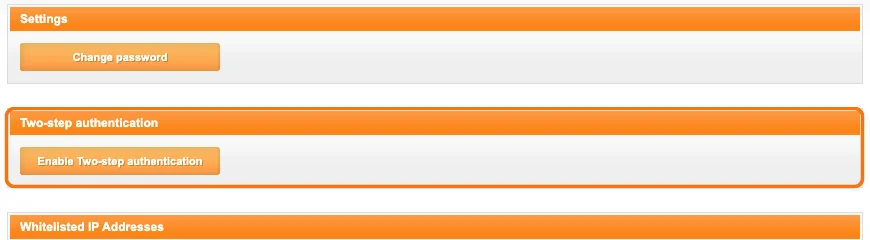
- Change password: Change your password. Don't use the same password as on other sites.
- Two-step authentication: Even if your password leaks, it makes it harder for someone else to log in.
- Whitelisted IP Addresses: Register the IP addresses allowed to log in, and check your login history (Authorization log). It's worth looking now and then for logins you don't recognize.
One more important point: don't share your account with others. The official FAQ says you can give a Premium account to someone else, but only one person may use it. Otherwise the account may be suspended.
3. What to watch for with downloaded files
Rapidgator is a service for storing and sharing files. The files on it were provided by whoever uploaded them.
- Viruses: Be especially careful with executable files (.exe and similar) and password-protected archives. Scan them with security software before opening.
- Check the source: Prefer files from a clear, known source over links you picked up on unknown sites or social media.
About copyright
The official FAQ says files that infringe copyright or contain illegal content are deleted as soon as they are found.
In Japan, downloading music, video, manga and similar content while knowing it was uploaded illegally is prohibited under copyright law. Also, if you upload files that infringe copyright, the rights holder may request disclosure of your identity. Use Rapidgator to store your own files, or to send files for work or to people you know.
Summary: checklist for using Rapidgator safely
| Item | What to do |
|---|---|
| Payment | If you bought on the official site, check the auto-renewal setting. Use a reseller if you don't want to enter card details |
| Password | Don't reuse passwords from other sites |
| Two-step authentication | Turn it on on your profile page |
| Login history | Check for logins you don't recognize |
| Sharing | Use the account by yourself only |
| Files | Scan for viruses before opening. Don't download illegal files |
FAQ
Q. Is it safe to enter my credit card details on Rapidgator?
According to the official site, payments are processed over an encrypted connection, the payment processor is PCI DSS Level 1 compliant, and Rapidgator itself does not store financial information. If you'd rather not enter card details on an overseas site, you can also buy a coupon from a Japanese reseller.
Q. Can Rapidgator charge me without me knowing?
Premium bought on the official site has auto-renewal on by default, and the same amount is charged 24 hours before it expires. If you don't want that, turn off auto-renewal on your profile page. Reseller coupons have no auto-renewal.
Q. Does Rapidgator have two-step authentication?
Yes. After logging in, you can turn it on under "Two-step authentication" on your profile page. You can also register the IP addresses allowed to log in and check your login history.
Q. Can I share my Rapidgator account with family?
The official FAQ says only one person should use an account. If several people use it, the account may be suspended.