Rapidgator Free Download Limits Explained
Updated ·RapidQuick editorial team (TUOPIC Co., Ltd.)
The short answer
A free Rapidgator account can download files up to 5GB, one file at a time, and cannot use download managers or accelerators (official FAQ, October 2026).
Free downloads are counted by IP address, so with a VPN or a shared proxy you may see "you have already downloaded" even when you have not downloaded anything.
Premium removes these limits: files up to 80GB, unlimited simultaneous downloads, and users are recognized by cookie instead of IP address.
Free vs Premium at a glance
Here is what the official Rapidgator FAQ and Premium page say, side by side.
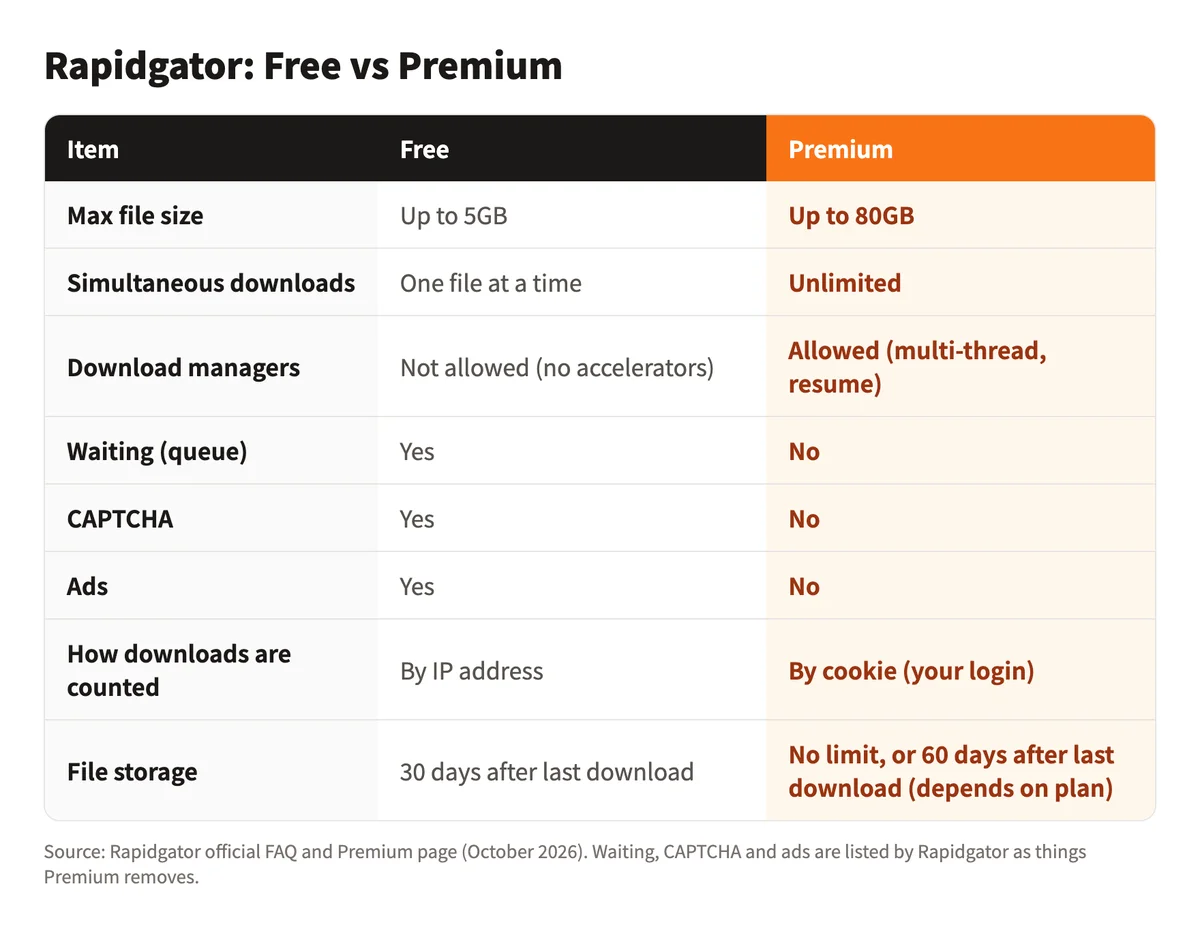
A free account is fine for downloading files under 5GB one at a time. You run into the free limits when a file is large or when you want to download several files in a row.
Limit 1: 5GB per file
In the official FAQ, the answer to "Is Rapidgator service free?" says free users can upload and download files up to 5GB.

Files over 5GB cannot be downloaded on a free account. With Premium, you can download files up to 80GB.
Limit 2: one file at a time, no accelerators
Free users can download only one file at a time. The official FAQ adds that download accelerators such as GetRight or FlashGet cannot be used.
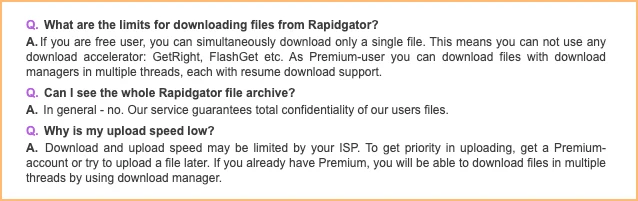
If you start a second download before the first one finishes, it will not start. Download your files one after another.
With Premium, a download manager can fetch several files at once and resume a download that stopped halfway.
Limit 3: downloads are counted by IP address
If you see "you have already downloaded" or "downloaded too much" without downloading anything, a shared IP address is the likely cause.
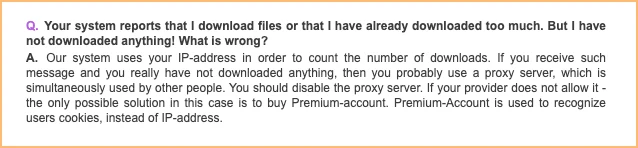
According to the official FAQ, Rapidgator counts free downloads by IP address. VPNs and shared proxies often give many people the same IP address, so other people's downloads are counted as yours.
There are two fixes:
- Turn off the VPN or proxy: connect directly from your home internet so the count uses your own IP address.
- Get Premium: Premium recognizes you by cookie (your login) instead of IP address, so other people's downloads do not affect you even with a VPN on.
More VPN tips are in Rapidgator slow or not downloading with Premium.
What Premium changes
The official Premium page lists six benefits:

- Download speed with no limits
- Unlimited simultaneous downloads
- No queues for file download
- No ads
- Download files up to 80GB
- Download securely over https
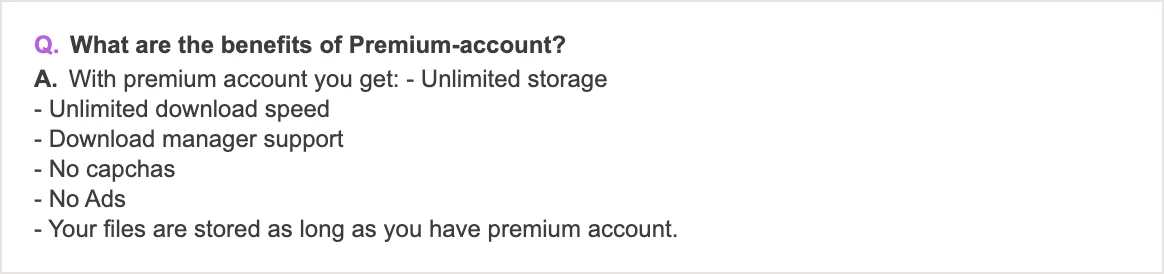
The official FAQ on Premium benefits also mentions download manager support and no CAPTCHAs.
Free users' files are deleted after 30 days
If you upload files, storage time differs too. According to the official FAQ, files uploaded by free or unregistered users are deleted 30 days after their last download.
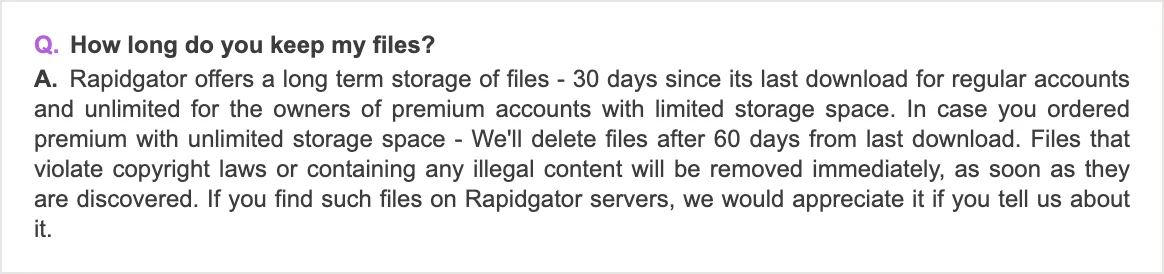
On Premium, plans with limited storage keep files with no time limit, and plans with unlimited storage delete them 60 days after the last download.
If the free limits get in the way
To download files over 5GB, download several files in a row, or keep your VPN on, you need Premium.
You can buy Premium on Rapidgator's site or with a coupon code. Purchases on the official site renew automatically by default (a subscription), while a coupon code is a one-time purchase, so you are never charged again automatically.
- Prices and how to use a coupon code: Rapidgator Premium prices and how to buy
- Which length is the best value: Rapidgator plans compared, 30 to 365 days
- Our prices: Rapidgator Premium product page (30 days from ¥3,200, about $20; pay by card, Apple Pay or Google Pay)
FAQ
Q. How big a file can I download from Rapidgator for free?
According to the official FAQ, free users can download files up to 5GB. Premium raises this to 80GB per file.
Q. Can a free Rapidgator account download several files at once?
No. Free users can download one file at a time and cannot use download managers or accelerators. Premium allows unlimited simultaneous downloads.
Q. Why does Rapidgator say I "downloaded too much" when I have not downloaded anything?
Rapidgator counts free downloads by IP address. With a VPN or shared proxy, other people's downloads can be counted as yours. Turn off the VPN, or use Premium, which recognizes you by cookie.
Q. Do I need to register to use Rapidgator?
According to the official FAQ, you can download and upload without registering. To use a Premium coupon code, you need a free account.