Fileboom Premium Plans: Normal vs PRO vs MAX Compared
Updated ·RapidQuick editorial team (TUOPIC Co., Ltd.)
The short answer
Fileboom premium comes in three plans, split by how much you can download per day. Normal (Premium) allows 20 GB a day, PRO 50 GB and MAX 100 GB (as shown on the official site in October 2026).
As a rule of thumb: Normal if 20 GB a day is enough, PRO for everyday use, and MAX if you sometimes download a lot of videos at once.
The 40-character code you receive after purchase is entered at fboom.me/auth/activationcode after logging in to Fileboom.
How the three plans differ
The premium page on the official Fileboom site (fboom.me) describes each plan like this:
| Plan | Daily download limit | Speed | Key differences |
|---|---|---|---|
| Free | 10 GB | Slow | Ads |
| Premium (Normal) | 20 GB | Fast | New users only on the official site |
| Premium PRO | 50 GB | Fastest | Online video playback |
| Premium MAX | 100 GB | Fastest | Video playback plus Collections and priority support |
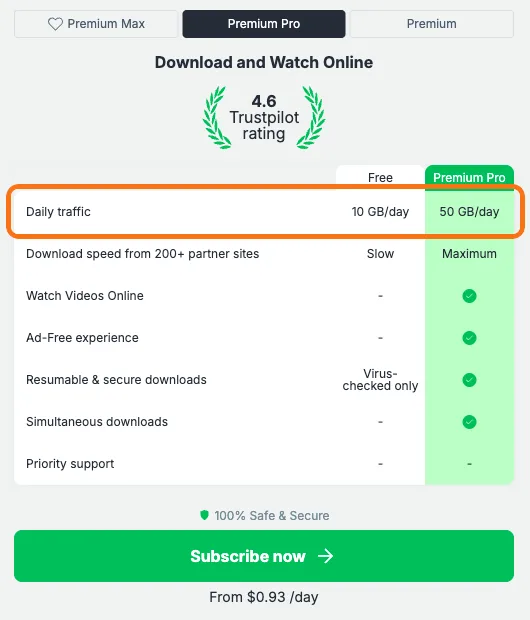
All plans include no ads, resumable downloads and multiple downloads at once.
Which plan to choose
Pick based on how much you download per day. The limit is daily, so you get the same amount again the next day.
- Normal (20 GB a day): you only download a few files now and then and want to keep the price down.
- PRO (50 GB a day): enough for most people. If you're unsure, go with PRO.
- MAX (100 GB a day): you sometimes download videos or archives in bulk, or don't want to wait for the limit to reset.
How to use the activation code
When you buy from RapidQuick, you get a 40-character alphanumeric activation code by email and on your account page. Fileboom is part of the same group as Keep2Share and TezFiles, and the code works the same way.
- Log in to Fileboom (fboom.me). If you don't have an account, create one for free with "Sign Up" in the top right.
- Open the code page (fboom.me/auth/activationcode). If you aren't logged in, you will be sent to the login screen, so open the page again after logging in.
- Paste the code and activate it.
The code won't work if spaces or line breaks get added before or after it when you copy it. Check that all 40 characters are there before pasting.
If the code doesn't work
The official help of the group that runs Fileboom says that if a code bought from a reseller has a problem, you should contact the reseller first. RapidQuick is an official reseller for this group. Contact us with your order number and we will check the code. If there is a problem, we will replace it or refund you.
FAQ
Q. What is the difference between Fileboom Normal, PRO and MAX?
The daily download limit. Normal (Premium) allows 20 GB, PRO 50 GB and MAX 100 GB. MAX also includes Collections and priority support.
Q. Where do I enter a Fileboom code?
Log in to Fileboom, then enter the 40-character code at fboom.me/auth/activationcode.
Q. Do purchased codes expire?
According to the operator's official support, codes have no expiry date before they are activated.