Rapidgator Payment Methods: Card Declined, JCB, Auto-Renewal
Updated ·RapidQuick editorial team (TUOPIC Co., Ltd.)
The short answer
The card payment on the official Rapidgator site shows only Visa and Mastercard (including Maestro) logos. JCB and American Express are not shown (as of October 2026).
Premium bought on the official site is an auto-renewing subscription. You are charged again for the same plan 24 hours before it expires. To stop this, turn off auto-renewal on your profile page.
If you don't have Visa or Mastercard, or don't want auto-renewal, you can buy a coupon from a reseller in Japan. You pay in Japanese yen, JCB is accepted, and there is no auto-renewal.
What to check first
If your card payment on Rapidgator fails, check these points in order to narrow down the cause.
- Card brand: Is it Visa or Mastercard? JCB, Amex and Diners are not shown on the official site.
- Card issuer limits: Has your card issuer blocked payments on overseas sites or in US dollars?
- Prepaid card: Prepaid cards such as Vpreca may not work for overseas subscriptions.
- Android app: On Android, you can also buy through Google Play.
Each point is covered below.
The official site accepts Visa and Mastercard
On the Premium purchase page of the official Rapidgator site (rapidgator.net/article/premium), the accepted card logos are shown below the "Buy Premium" button.
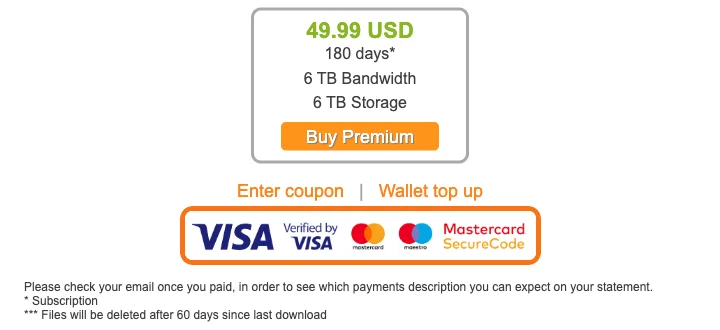
The logos shown are Visa (Verified by Visa) and Mastercard (Maestro, Mastercard SecureCode). There are no JCB, American Express or Diners Club logos. If your JCB card (common in Japan) is declined, this is often the reason.
Prices are shown in US dollars (USD). If your card is in another currency, your card issuer converts the amount. Exchange rates and foreign transaction fees differ by issuer, so the actual charge may differ a little from the listed price.
Your card issuer may be blocking it
If a Visa or Mastercard payment still fails, your card issuer's security may have stopped it. Some issuers (Japanese card issuers in particular) ask for 3D Secure verification on overseas sites, or block payments they think may be fraud.
- Check payment alerts and error history in your card issuer's app or website
- Check that you are enrolled in 3D Secure
- If you still can't tell, contact your card issuer and say that payments on an overseas site are being declined
The official Rapidgator site also says you can find the name that appears on your statement by checking the email you receive after payment. The name is not always "Rapidgator". Keep the email after you pay so you don't mistake the charge for one you didn't make.
Prepaid cards such as Vpreca
Vpreca is a Visa-branded prepaid card sold in Japan. But overseas sites often don't accept prepaid cards for auto-renewing (subscription) payments. If the payment fails even with enough balance, it is faster to try another method.
Buying on the official site means auto-renewal
Premium bought through "Buy Premium" on the official site is an auto-renewing subscription. The FAQ at the bottom of the purchase page says this:

In short:
- When you buy Premium, you are signed up for auto-renewal by default
- 24 hours before Premium expires, you are charged again for the same plan
- You can turn off auto-renewal on your Rapidgator profile page
If you only want to use it once, turn off auto-renewal on your profile page after you buy.
Ways to pay without a card
Buy in the Android app (Google Play)
At the top of the purchase page on the official site, there is a notice that you can buy Premium through Google Play in the Android app.

When you buy through Google Play, you can use any payment method saved in Google Play (such as carrier billing or Google Play gift cards). Prices and auto-renewal follow what Google Play shows.
Buy a coupon from a reseller in Japan
Rapidgator has an official reseller program. You can buy a coupon from a reseller and enter it in your own account to get Premium. RapidQuick is one of these resellers.
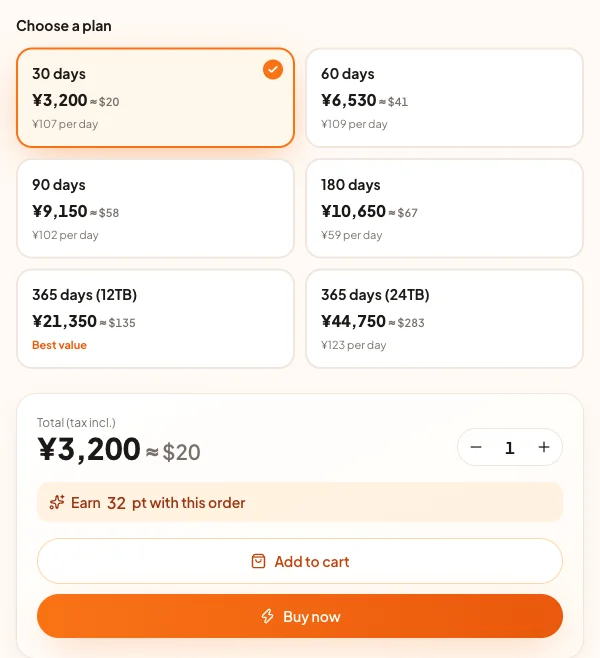
- Pay in Japanese yen: The listed price is what you are charged (tax included).
- JCB and Amex work too: We accept Visa, Mastercard, JCB, American Express and other cards, plus Apple Pay and Google Pay.
- No auto-renewal: The coupon adds a fixed number of days one time, so there is nothing to cancel.
You enter the coupon under "Enter coupon" on the purchase page of the official site. For the steps with screenshots and the bandwidth for each plan, see How to buy Rapidgator Premium and apply a coupon.
Summary of each method
| Official site (card) | Android (Google Play) | Reseller coupon | |
|---|---|---|---|
| Payment methods | Visa, Mastercard | Google Play payment methods | Depends on the reseller (RapidQuick also accepts JCB, Amex, Apple Pay and more) |
| Currency | US dollars | As shown in Google Play | Japanese yen |
| Auto-renewal | Yes (can be turned off) | As shown in Google Play | No |
| What you need | A Rapidgator account | An Android device and an account | A Rapidgator account |
FAQ
Q. Can I use a JCB card on Rapidgator?
As of October 2026, the card payment on the official site shows only Visa and Mastercard (including Maestro) logos. JCB is not shown. If you want to pay with JCB, you can buy a coupon from a reseller in Japan that accepts JCB.
Q. Does Rapidgator Premium auto-renew?
If you buy on the official site, auto-renewal is on by default and you are charged for the same plan 24 hours before it expires. You can turn off auto-renewal on your profile page. Reseller coupons add a fixed number of days one time and do not auto-renew.
Q. Can I pay with a Vpreca prepaid card?
Vpreca is a Visa prepaid card, but prepaid cards are often declined for auto-renewing payments on overseas sites. If yours is declined, you can buy through Google Play on Android or use a reseller coupon.
Q. What name appears on my card statement?
According to the official site, you can find the name on your statement in the email you receive after payment. It may not say "Rapidgator", so keep that email after you pay.