Best File Hosting by Purpose: Daily Download Limits Compared
Updated ·RapidQuick editorial team (TUOPIC Co., Ltd.)
The short answer
First decide whether you want to store files or download them. To keep photos or work data for a long time, use pCloud. If downloading is the goal, you need a Premium plan on a file hosting service.
For downloading, compare the daily limit. It ranges from 200GB a day on DDownload and 195GB on Kenfiles PRO down to 20GB on Fileboom Normal, a difference of nearly 10 times.
If you already know which file you want, you need Premium on the service where that file is hosted. Premium on a different service will not make it faster.
If you're not sure, answer these three questions in order to narrow down your options.
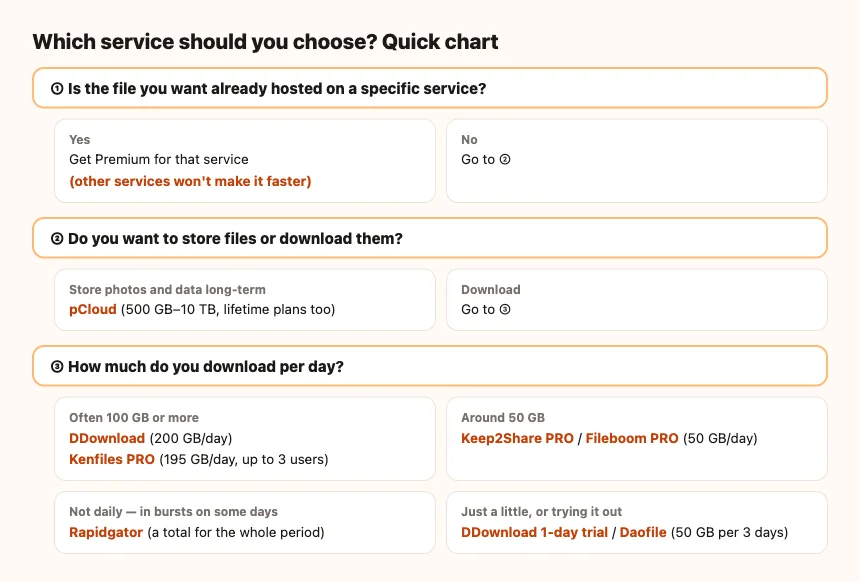
First decide: storage or downloading
Overseas storage services fall into two broad types.
- Cloud storage (pCloud and others): services for syncing and backing up files from your computer or phone and keeping them long term. The price depends on how much storage you get.
- File hosting services (Rapidgator, Keep2Share, DDownload and others): services for uploading large files and sharing or receiving them by link. Premium mainly changes download speed and volume.
If you're looking for a place to keep photos or work data, choose cloud storage. File hosting services may delete files on free accounts (on Kenfiles, files are deleted 60 days after their last download).
Compare daily download limits
Premium plans on file hosting services set a daily download limit (bandwidth) for each plan. Here is what each official site showed as of October 2026.
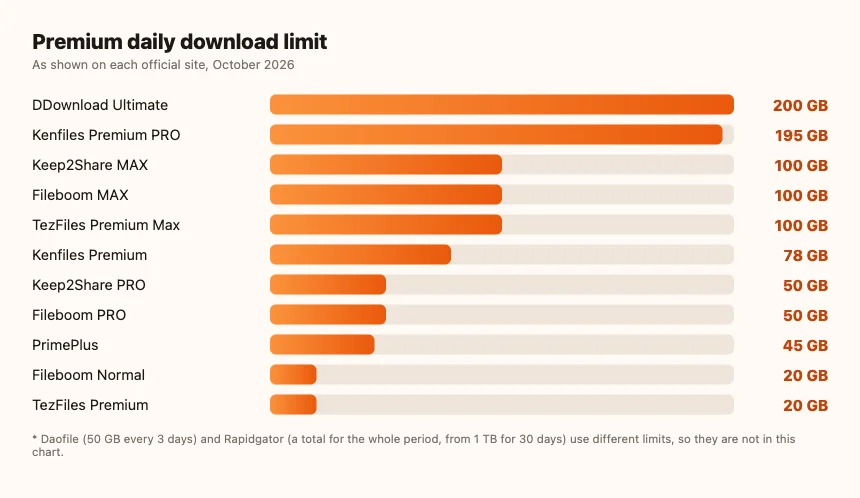
| Service and plan | Download limit | Notes |
|---|---|---|
| DDownload Ultimate | 200GB a day | Unlimited storage |
| Kenfiles Premium PRO | 195GB a day | Up to 3 users |
| Keep2Share MAX | 100GB a day | |
| Fileboom MAX | 100GB a day | Online video playback |
| TezFiles Premium Max | 100GB a day | |
| Kenfiles Premium | 78GB a day | |
| Keep2Share PRO | 50GB a day | |
| Fileboom PRO | 50GB a day | Online video playback |
| PrimePlus | 45GB a day | |
| Fileboom Normal | 20GB a day | |
| TezFiles Premium | 20GB a day | |
| Daofile | 50GB per 3 days | Resets every 3 days |
| Rapidgator | Total for the period (1TB for 30 days to 12TB for 365 days) | A total, not a daily limit |
A daily limit resets the next day, so you get the same amount again. Daofile works in 3-day units, and Rapidgator uses a total for the whole period. That is how they differ from the others.
Recommendations by purpose
Keep photos or work data long term
pCloud fits best. You can sync with the desktop and mobile apps and choose 500GB, 2TB or 10TB. If you plan to use it for years, lifetime is cheaper than annual. We work out how many years it takes to break even in pCloud lifetime vs annual.
Download a lot every day
If you often download 100GB or more a day, choose DDownload (200GB a day) or Kenfiles Premium PRO (195GB a day). DDownload keys start with "DDL-" and you enter them from the dashboard.
Everyday use (around 50GB a day)
For most people, the 50GB a day on Keep2Share PRO or Fileboom PRO is enough. If some days go over 50GB, MAX on the same service (100GB a day) gives you room.
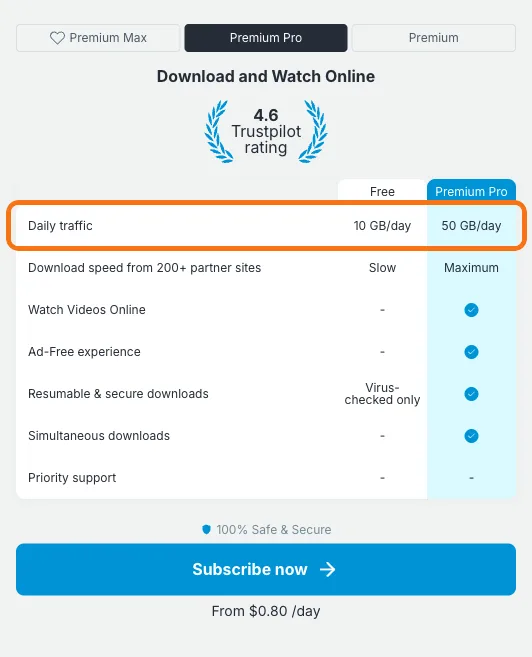
We cover the differences in Keep2Share PRO vs MAX and how to choose a Fileboom plan.
Uneven use (big downloads on some days)
Rapidgator is based on a total amount for the period (such as 1TB for 30 days), not a daily limit. It suits people who don't download every day but download a lot when they do. But once you use up the total, Premium ends even before the expiry date. See how to buy Rapidgator Premium for details.
Share one plan with family or coworkers
Kenfiles Premium PRO is the plan whose official plan table lists 3 users. Its daily download limit is also large at 195GB. The plan differences are in how to choose a Kenfiles plan.
Try it first, or only use it now and then
- DDownload trial (1 day): when one day is enough.
- Daofile: 50GB per 3 days. For people who use a little every day (how Daofile traffic works).
- Fileboom Normal: 20GB a day, for people who want to keep the cost down.
Buy a long period at once
Daofile 999 days is for people who don't want to renew every year. pCloud lifetime also has no renewals once you pay.
If you already know the file, choose that service
On file hosting services, downloads are only faster with Premium on the service where the file is hosted. For example, to download a file on Keep2Share faster, you need Keep2Share Premium. For a file on Fileboom, you need Fileboom Premium.
Keep2Share, Fileboom, TezFiles and PrimePlus belong to the same group, but Premium is separate for each site. How to use a PrimePlus code also explains that you enter it in a different place from Keep2Share.
Things to check before you choose
- The numbers here are what each official site showed as of October 2026. Plan details can change.
- Our codes add a fixed number of days once. They do not renew automatically, and they end when they expire.
- The periods available on the official site and with reseller codes can differ. Check each product page for the periods and prices we offer.
FAQ
Q. Which service lets you download the most per day?
According to the official sites as of October 2026, DDownload Ultimate is the highest at 200GB a day, followed by Kenfiles Premium PRO at 195GB a day.
Q. Which is best for backing up photos?
For long-term storage, pCloud is the better fit because it is cloud storage built for syncing and backup. File hosting services are for sharing and downloading, and they may delete files on free accounts.
Q. Is there a service where my family can share one plan?
Kenfiles Premium PRO can be used by up to 3 people. It allows up to 195GB of downloads a day.
Q. Does Keep2Share Premium make Fileboom files faster too?
No. Even within the same group, Premium is separate for each site. You need Premium on the service where the file is hosted.